Healthcare Data Archiving: Best Practices and Key Benefits

Every healthcare administrator knows the feeling of being tethered to the past. Often, this manifests as a legacy EHR system that the organization outgrew years ago, yet it continues to run in the background. In other cases, the problem is more subtle: an active system that has become sluggish because it is weighed down by twenty years of inactive patient records.
The data within these systems is too valuable and legally significant to simply delete. However, keeping it in the daily workflow environment creates significant friction. This is the central challenge of modern health informatics. As organizations merge, acquire smaller practices, or simply age, they accumulate a massive trail of data. This is where healthcare data archiving becomes a strategic necessity rather than just a technical checkbox.
Transitioning to a dedicated healthcare data archiver allows organizations to decommission aging hardware or "prune" an active system to keep it running at peak performance. By moving away from the "keep everything in the active view" mindset, IT leaders can redirect their budgets toward innovation rather than just maintenance. When we talk about data archiving for healthcare, we are really talking about reclaiming the IT budget and reducing the technical debt that slows down practice operations.
Healthcare Data Archiving, Simplified
Why Archiving Outperforms Simple Backups
It is a common error to assume that a standard data backup is the same as an archive. While backups are designed for disaster recovery and short-term restoration, healthcare data archiving solutions are built for long-term retention, regulatory compliance, and ease of access.
Backups are often stored in proprietary formats that require the original software to read. If you back up a legacy EHR and then shut down the server, those files might be unreadable five years later during a legal request or an audit. An archive, by contrast, extracts the data and stores it in a standardized, searchable format. This ensures that even if the original application is long gone, the information remains at your fingertips.
Furthermore, a backup is a static snapshot. It does not allow for easy searching across multiple patient records for reporting purposes. A high-quality healthcare data archiver provides a "single pane of glass" view. This means your staff can search for a patient’s history across three different legacy systems simultaneously, or find an inactive record that was moved out of the active EHR to improve system speed, without having to remember different sets of login credentials.
The Dual Role of Archiving: Transition vs. Optimization
While many discussions around archiving focus on EHR transitions, there is a second, equally important application: daily workflow optimization.
Streamlining the Active Workflow
When a doctor searches for a patient named "John Smith" in a system that contains 30 years of data, the system must sort through every John Smith who has ever walked through the doors. This leads to latency, "spinning wheels," and frustration among clinicians. By moving inactive patient records (those not seen in three to five years) to an archive, you reduce the load on your primary EHR. This makes the system faster for the patients who are actually in the building today.
Simplifying EHR Transitions
During a merger or a system upgrade, the temptation is to migrate every single byte of data into the new EHR. However, this is incredibly expensive and often leads to "data mapping" nightmares. A more efficient approach is to migrate only the most recent and relevant clinical data (such as the last two or three years of records) and move the rest into healthcare data archiving solutions. This keeps the new system clean and prevents it from becoming bloated on day one.
The Primary Benefits of Healthcare Data Archiving
The move toward specialized healthcare data archiving solutions is driven by more than just a desire for cleaner server rooms. The advantages touch every part of the organization.
1. Cost Mitigation and Immediate ROI
Maintaining a legacy system involves licensing fees, specialized hardware support, and electricity costs. In many cases, the
cost of maintaining a single legacy EHR for three years exceeds the one-time cost of archiving its entire contents. By decommissioning these systems, organizations realize a near-immediate return on investment.
2. Strengthened Security and Risk Management
Legacy systems are often the weakest link in a practice’s cybersecurity chain. They frequently run on outdated operating systems, such as Windows Server 2008, that no longer receive security patches. This makes them prime targets for ransomware. One of the key benefits of healthcare data archiving is the ability to move this vulnerable data into a secure, modern environment that is much easier to defend.
3. Compliance with the 21st Century Cures Act
The regulatory landscape is shifting toward total data transparency. The
21st Century Cures Act mandates that patients have easy access to their electronic health information (EHI) without information blocking. If a patient requests their records and your organization cannot provide them because they are trapped in a legacy system that no longer functions properly, you may be in violation of federal law. Proper archiving ensures that this data is always exportable and accessible.
Healthcare Data Archiving Best Practices: A Roadmap
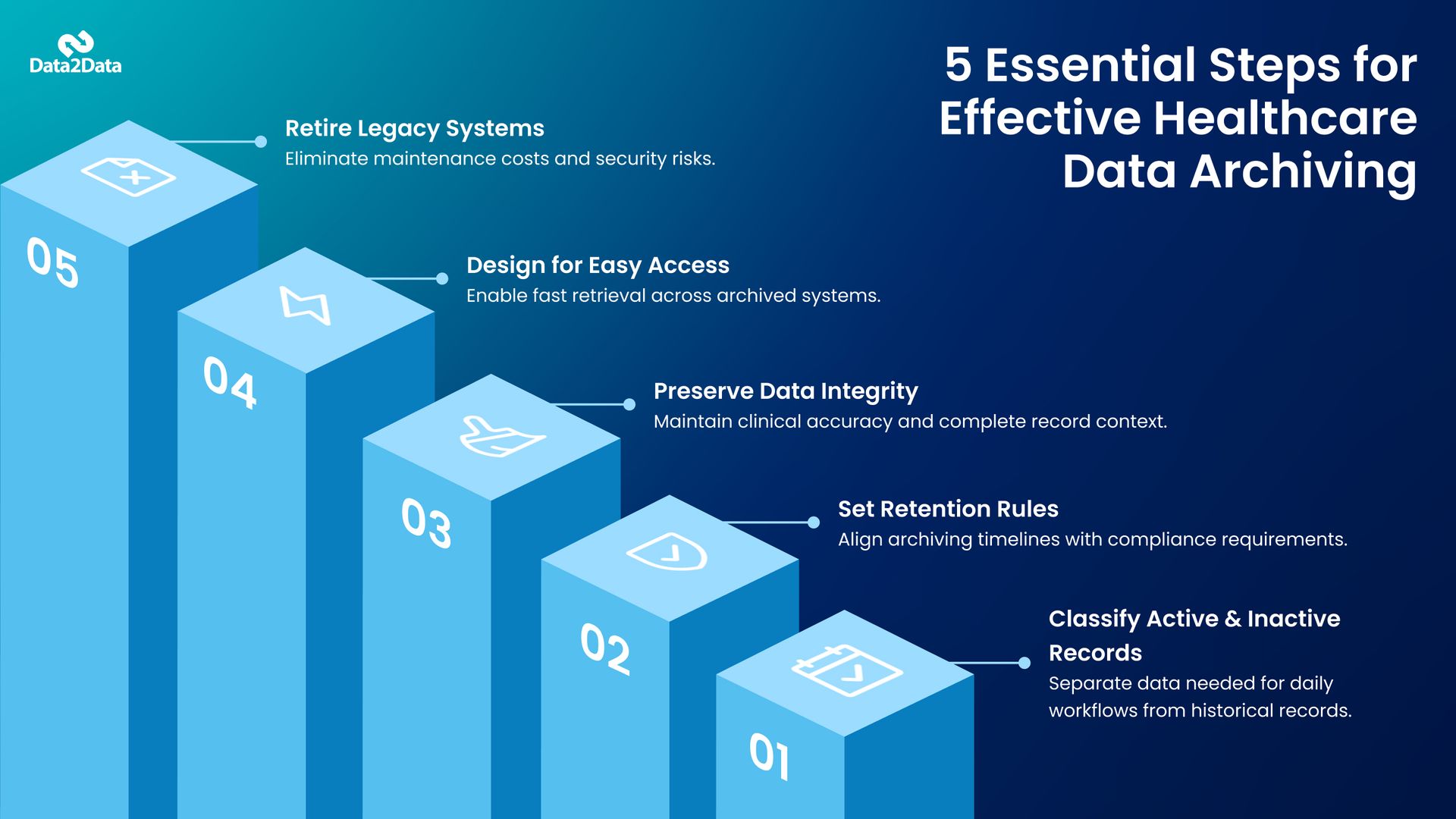
Successfully moving data from an active environment to an archive requires a disciplined approach. It is not a matter of simply moving files; it is a matter of preserving the integrity and context of medical records. Following healthcare data archiving best practices ensures that the data remains useful for decades.
Step 1: Define "Inactive" vs. "Active" Data
Before you begin the archiving process, you must define your criteria for what stays in the daily workflow and what moves to the archive. Most organizations choose a cutoff based on the last date of service, such as three or five years. By establishing these rules early, you can automate the process of keeping your production system lean.
Step 2: Define Your Data Retention Policy
You must also understand your legal obligations. Retention periods vary by state and by the type of patient. For example, pediatric records must often be kept until the patient reaches the age of majority plus several years. Your strategy should begin with a clear policy that dictates how long data must stay in the archive before it can be safely purged.
Step 3: Prioritize Data Integrity and Mapping
One of the greatest risks in archiving is the loss of context. If a lab result is moved without its corresponding date, units of measure, or the provider’s notes, the data loses its clinical value. Working with an experienced healthcare data archiver ensures that data is mapped correctly from the old system to the new one, including both discrete data, such as vitals, and non-discrete data, such as scanned PDFs.
Step 4: Focus on Searchability and Access
An archive is only useful if you can find what you need in seconds. Ensure your solution offers robust search filters, such as patient name, DOB, or social security number. The goal is to make the retrieval of an inactive record as fast as a search in your current system. This is particularly important for the Health Information Management
(HIM) team.
Step 5: Decommission with Confidence
Once the data is successfully moved and verified, the final step is the physical and logical decommissioning of the old system or the purging of inactive files from the active EHR. This is where the cost and performance benefits are truly realized.
The Role of Data2Data in Your Transition
The technical landscape of healthcare is too complex for a one-size-fits-all approach. When evaluating healthcare data archiving solutions, it is important to look for partners who understand the nuances of clinical data. It isn't just about moving bits and bytes; it is about preserving the clinical narrative that providers rely on.
At Data2Data, we specialize in bridging the gap between old technology and new possibilities. Our approach ensures that your transition is seamless, your data remains secure, and your IT team is freed from the burden of legacy maintenance. We focus on the heavy lifting of data mapping and migration so you can focus on patient care. Whether you are removing inactive patients from your current workflow or navigating a total system replacement, we provide the expertise needed to turn legacy data into a strategic asset.
| Feature | Data2Data’s Advantage |
|---|---|
| HIPAA-Compliant Storage | End-to-end encryption and role-based access control. |
| Seamless EHR Integration | Works with Epic, Cerner, and other major EHR systems out of the box. |
| Scalable Architecture | Handles petabytes of data with zero downtime. |
| 24/7 Support | Dedicated healthcare IT experts to troubleshoot and optimize your archiving strategy. |
Tackling the Technical Challenges: Discrete vs. Non-Discrete Data
When discussing data archiving for healthcare, one of the most significant technical hurdles is the variety of data formats. A patient’s record isn't just a list of appointments; it is a complex mix of numeric values, narrative notes, and imaging data.
A superior healthcare data archiver must be able to ingest all these formats and present them in a cohesive way. For example, when a clinician looks up an inactive patient, they should see the discrete lab values alongside the PDF of the surgical report from the same date. If your archive can't handle multiple file types, your staff will be forced to hunt through different folders, defeating the purpose of an integrated solution.
Security in the Age of Health Data Breaches
The healthcare sector remains a primary target for cyberattacks. A major reason for this is the persistence of legacy systems that exist outside the primary security perimeter of the practice. These legacy islands often do not support Multi-Factor Authentication (MFA) or modern encryption.
By implementing healthcare data archiving best practices, you move that vulnerable data into a modern environment that supports MFA, end-to-end encryption, and detailed audit logs. This doesn't just protect the patient; it protects the organization from the massive fines and reputational damage associated with a data breach. In today’s environment, archiving is as much a security strategy as it is a data strategy.
Checklist: Is Your Organization Ready for Archiving?
The healthcare sector remains the most targeted industry for cyberattacks. A major reason for this is the persistence of legacy systems. These legacy islands often lie outside the practice’s primary security perimeter. They might not be integrated with modern Identity and Access Management (IAM) tools, meaning they don't support Multi-Factor Authentication (MFA).
| Step | Action Item | Priority |
|---|---|---|
| 1 | Identify all legacy systems currently incurring licensing or maintenance costs. | High |
| 2 | Review state-specific data retention laws for adult and pediatric records. | High |
| 3 | Audit the security vulnerabilities of servers running outdated operating systems. | Medium |
| 4 | Survey clinicians on how often they need to access data from the old EHR. | Medium |
| 5 | Evaluate the cost of an archive versus the cost of 5-year legacy maintenance. | High |
| 6 | Verify if current legacy systems support the "Information Blocking" requirements. | High |
Final Thoughts
The volume of medical data is growing at an exponential rate. Trying to manage that growth by simply stacking new systems on top of old ones is a recipe for technical debt and operational inefficiency. By implementing a clear strategy for healthcare data archiving, you aren't just cleaning up your digital basement; you are building a more agile, secure, and cost-effective foundation for your organization.
The transition may seem daunting, but the risks of doing nothing, including security breaches, system failures, and sluggish workflows, are far higher. Now is the time to evaluate how your legacy data is serving you, and more importantly, how it might be holding you back. Efficient healthcare data archiving solutions allow you to honor the past while moving confidently into the future.
Get a Data Archiving Assessment
Frequently Asked Questions
How long does a typical healthcare data archiving project take?
The timeline depends on the volume of data and the complexity of the legacy system. Most projects range from three to six weeks. A structured approach ensures that data is verified at every step, preventing delays during the final transition.
Is archived data still HIPAA compliant?
Yes, provided it is stored in a platform that meets all HIPAA technical safeguards. This includes encryption in transit and at rest, audit logs, and strict access controls. A dedicated healthcare data archiver, such as Data2Data, is designed to meet these federal standards.
Can we archive data from multiple EHRs into one place?
Yes. Healthcare organizations often use multiple EHR systems across departments or acquired practices. An archiving platform consolidates historical data from all legacy EHRs into one secure, centralized repository. This simplifies access to patient records, reduces legacy system costs, and supports compliance and long-term retention needs.
Can I archive patients while staying on my current EHR?
Yes. This is a common strategy to improve system performance. By moving inactive patient data to a healthcare data archiver, you reduce the size of your production database, which leads to faster search times and better overall system stability.
How does archiving assist with legal discovery?
In the event of a malpractice suit or an audit, your legal team needs to quickly locate specific records. An archive allows for keyword searching and rapid exporting of a patient’s Legal Health Record, saving hundreds of hours of manual labor.